 See more from Ask Carzone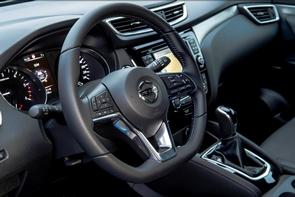
How to change time on my Qashqai?
How do I change the time in my Nissan Qashqai nconnecta automatic 2019
Our answer:
Hi Jim,
On your steering wheel’s left-hand spoke, you should see a rocker switch with ‘ENTER’ marked on it and ‘up’ and ‘down’ triangular arrows above and below it. Have your ignition on, then click the switch downwards until the screen between your speedometer and your rev counter in the instrument cluster shows ‘SETTINGS’. Now press the switch on your steering wheel (i.e., press ‘ENTER’, don’t rock it up or down) and you should see a list of options. The second one down should be ‘CLOCK’. Click down once to highlight it, then press ENTER again. A message should come up, saying ‘Set the clock in Audio’. Now look at your infotainment screen and controls in the centre stack of the car; there should be a round dial to the bottom-right with ‘TUNE . FOLDER’ written above it and ‘ENTER – SETTINGS’ marked upon it. Press this dial and the screen should show the clock settings. Highlight ‘CLOCK ADJUST’ by rotating this dial to the right/clockwise, then press the dial again. This should highlight the hour of the clock, which you can adjust by rotating the dial clockwise and anti-clockwise until you have the correct hour. Press ENTER on that dial again, adjust the minutes in the same way, press ENTER again and all the time displays in your Qashqai should be correct.

Have a motoring question? Ask us here!
Ask us anything motoring related and please provide as much information as possible so we can give you the most accurate advice.